|
Roland Weigelt's
EMAROO
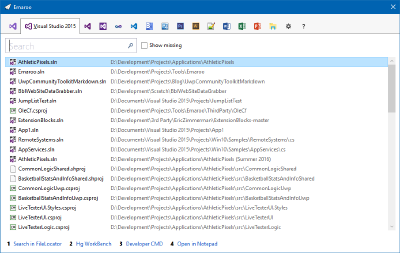
A free utility for browsing most recently used
(MRU) file lists of programs like Visual Studio, Word, Excel,
PowerPoint and more. Quickly open files, jump to their folder in
Windows Explorer, copy them (and their path) to the clipboard -
all with just a few keystrokes or mouse clicks..
Current version: 6.6.1 (released 2026-08-04)
|
|
|
|

- Upgrading from an earlier version? Simply run the new setup, no need to uninstall the old version first.
- Looking for ready-to-use custom actions? Visit the custom action repository on GitHub.
- Want to write your own custom actions? The step-by-step guide gets you started in no time!
Supported Applications
- Visual Studio 2026/2022/2019/2017
- Visual Studio Code
- Microsoft Word (Office 365/2016/2013/2010/2007)
- Microsoft Excel (Office 365/2016/2013/2010/2007)
- Microsoft PowerPoint (Office 365/2016/2013/2010/2007)
- Photoshop 2026/2025
- Illustrator 2026/2025
- InDesign 2026/2025
- Notepad++
- Typora markdown editor
Features
-
For developers
- Quickly access most recently used projects in Visual Studio 2026 and older.
- Specify that a project should be opened in Visual Studio "as administrator".
- Open files/directories in Visual Studio Code.
- Quickly access most recently used projects in Blend.
- Open the project directory in Window Explorer.
- Copy the project file/directory to the clipboard.
- Run ".exe" or ".cmd" files in the project directory.
- Quickly open ReadMe files (HTML/Markdown) in the project directory.
- Use a custom action to call a tool of your choice and pass the selected file or directory as an argument.
Ready-to-use custom actions on GitHub:
- Open old projects in newer versions of Visual Studio.
- Open the directory of a Visual Studio project in Visual Studio Code.
-
For Office users
- Quickly access most recently used Word/Excel/PowerPoint documents.
- Open the directory containing a document in Windows Explorer.
- Copy the document to the clipboard.
- Use a custom action to call a program of your choice and pass the selected file or directory as an arguments.
Ready-to-use custom actions on GitHub:
- Create a new mail in Outlook, with the selected file as an attachment.
-
For designers
- Quickly access most recently used Photoshop/Illustrator/InDesign files.
- Open the directory containing a file in Windows Explorer.
- Copy the file to the clipboard.
- Use a custom action to call a program of your choice and pass the selected file or directory as an arguments.
Tip: Use a global hotkey!
For a tool like Emaroo that is started rather often and is easy to use via keyboard, it makes sense to launch it using a global hotkey. The easiest way to do this in Windows 7 and up is to pin Emaroo to the task bar and start it using Win+<digit> (with <digit> corresponding to the position of the icon in the task bar).
System Requirements
- Windows 10 and up
- .NET Framework 4.8
Emaroo FAQ
What does the name "Emaroo" stand for?
Emaroo is inspired by "most recently used" = MRU = "em ar you". I took artistic liberty to change the pronunciation to create a short name that looks good in written form.
What does "free" mean, what's the license for the application?
Emaroo is "free" as in "free beer".
See the license for more information.
| DE: Impressum, Datenschutz | EN: imprint, privacy policy | Copyright © 2026 Roland Weigelt |